Tuesday, August 28, 2012

Android: can't upgrade read-only database from version 0 to 1

Solution:

If you have named one of your SQLite tables "default", change the name to something else.

Details:

So I was poking around with Android programming the other day, and I ran into this error:

04-12 14:35:09.779: ERROR/AndroidRuntime(790): Caused by: android.database.sqlite.SQLiteException: Can't upgrade read-only database from version 0 to 1: /data/data/com.example.test/databases/mydatabase.db
04-12 14:35:09.779: ERROR/AndroidRuntime(790): at android.database.sqlite.SQLiteOpenHelper.getReadableDatabase(SQLiteOpenHelper.java:170)


The line causing the error was simply calling SQLiteOpenHelper.getReadableDatabase():

SQLiteDatabase db = dbHelper.getReadableDatabase();

I finally narrowed it down to the database table name I was using: "default". As soon as I changed the table name, it worked fine. In fact, I simply changed it from "default" to "default1".

Just to be clear, I wasn't doing anything fancy. I was using pretty basic code to create the database:

public class DatabaseHelper extends SQLiteOpenHelper {
    public static final String DB_TABLE_NAME = "default";
    ...
    public static final String DB_TABLE_CREATE =
        "CREATE TABLE " + DB_TABLE_NAME...


It doesn't appear to be a SQLite thing, because according to their documentation the only reserved table names begin with "sqlite_". So it appears to be an Android issue, and as far as I can tell it isn't documented.

I checked the database after I changed the name, and the "default" table was never created either, so I'm not sure why it wouldn't work:

sqlite> .tables
android_metadata default1


A bug, perhaps?
Thursday, August 23, 2012

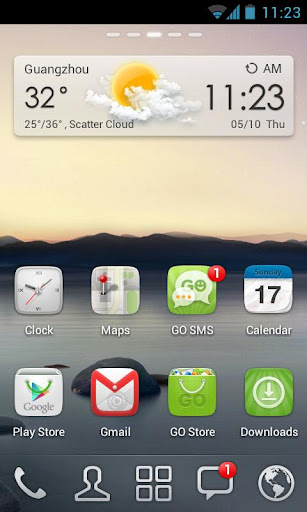
GO Launcher EX: a great LauncherPro replacement


I've been using LauncherPro for my android launcher/home screen for a while. I was quite happy with it at first, but I've been gradually growing less pleased with it:
  • It hangs/crashes every time my phone first boots up

  • If I accidentally long press on one of my widgets, I get an annoying nag screen to buy the pro version

  • Over a year ago, it stopped showing my unread gmail count
Why have I still been using LauncherPro then? it has a really cool scrollable dock that allows me to put multiple rows of my most used shortcuts.

Well, byebye launcherpro. I just stumbled across GO Launcher EX, and:

Wednesday, August 22, 2012

Fix Half Life 2 lighting issues


Solution:

  • You need to be using a video card that supports DirectX 9 and the DirectX level in Half Life 2 needs to be 90 or higher. In the console, type mat_dxlevel to see the directx level. To set it to 90, for example, type mat_dxlevel 90

  • HDR needs to be fully enabled. The easiest way to do this (after correctly setting the directx level) is by typing this in the console: mat_hdr_level 2 and then type mat_hdr_enabled to make sure HDR is in fact enabled.

  • Lastly, if the lighting is still messed up, type mat_fullbright 0 in the console to fix it.

  • An alternative is to download these files:
    http://uploading.com/b84125d7/ldr_fix-exe
    http://uploading.com/3mb5mdm9/sky_fix-exe

    Open them to extract the files (in Linux, you can open them using Wine). Then copy the files to SteamApps/common/Half-Life 2/hl2/maps in your Steam installation folder (~/.local/share/Steam on Linux, or in C:/Program Files on Windows).

Details:

I was recently playing Half Life 2 on Linux using Wine, and at one point, all the lighting messed up. It basically looked like there were no shadows at all. The screenshot above is supposed to be in a dark tunnel.

Supposedly this was caused by an update to the Half Life 2 maps when the orange box was released. Somehow or another, some of the maps require HDR to be enabled for the lighting to work. HDR is only supported in DirectX 9 and higher, and I was setting the DirectX level to 80 (DirectX 8.0) by using the -dxlevel 80 flag in the launch options. I had to remove that flag, and then take the steps above to fix the problem.

Once I did fix the lighting, the game got significantly slower. Still playable, but a lot more annoying to play. Using some of my tips on playing Half Life 2 on an older computer helped, but some of the textures are messed up.  This may affect other source games as well.

Now that Half Life 2 is playable natively on Linux, this is issue will probably only affect Windows users.

Wednesday, August 15, 2012

Cross-platform mobile development: PhoneGap + Enyo


If you want to develop a mobile application, but don't want to have to rewrite it for every platform you want to develop for (Android, iOS, etc.), PhoneGap is what you want. It allows you to develop applications using web technologies (HTML, CSS, JavaScript), and then deploy them to a large number of platforms, such as Android and iOS. It has APIs that let you interface directly with the mobile device's hardware (camera, GPS, accelerometer, you name it). It's even been approved by Apple, and we all know what a feat that is ;)

Undoubtedly you'll want a nice framework that gives you all the UI widgets you're used to: layouts, spinners, popups, progress bars, etc. That's where Enyo comes in. Enyo was actually the JavaScript framework that was part of WebOS. Since WebOS has been open-sourced, so has Enyo. I would recommend Enyo over other JavaScript frameworks like jQuery Mobile and Sencha; see here for some reasons why: Enyo+PhoneGap Vs jQueryMobile+PhoneGap

There are already some apps out there using this approach. Here are a couple for android:
I've even done some playing around with phonegap and the enyo samples myself. I put it in github in case it's of any interest:
https://github.com/bmaupin/junkpile/tree/master/java/testing/android-phonegap-enyo-test

The screenshots in this post are from that code, and you can see more here:
https://github.com/bmaupin/junkpile/tree/master/java/testing/android-phonegap-enyo-test/screenshots

Enjoy!

Thursday, July 19, 2012

The evolution of Android Arabic support

Now that full Arabic support has finally been added to the latest version of Android (4.1, nicknamed Jelly Bean), here are some details as to what extent Arabic has been supported in previous versions:

up to and including Android 2.1:


No Arabic support whatsoever. Any attempt to show Arabic text will result in rectangular boxes instead of characters. Applications that wish to support Arabic must include their own Arabic font. There is no shaping support, meaning letters will not connect to each other, but this can be provided by a third-party library. In addition, the diacritics/harakat will not be properly placed and will often overlap, making them difficult to read.

Android 2.2 - Android 2.3:


In Android 2.2, an Arabic font was added (DroidSansArabic), which is the default Arabic font in Android until Android 4.0. still no shaping or diacritic support.

Android 3


With Android 3.0, shaping support is finally added, so now the Arabic letters will connect without the aid of a third-party library. Still no diacritic support.

Android 4.0


The default Arabic font is changed to Droid Naskh, and another Arabic font is added to replace DroidSansArabic: Droid Kufi. Still no diacritic support.

Android 4.1


Finally, full Arabic support, including support for diacritic placement!

Friday, July 6, 2012

Pimsleur: the best way to learn a language

First, a disclaimer: I'm not getting paid to say this. I am not affiliated with Pimsleur in any way, and there are no affiliate links here. I'm simply a huge fan of a great product.

I've used many programs to study languages, including (but not limited to):
  • Berlitz
  • Living Language
  • Rosetta Stone
  • Teach Yourself
  • VocabuLearn
Pimsleur beats them all, hands down. Here's why I recommend it to anyone wanting to learn a language:
  1. It teaches you using the same methods you used to learn your first language as a baby. So the focus is on listening and speaking, and you learn the grammar intuitively. So no more studying charts, paradigms, conjugations, etc.

  2. The repetition is built-in. With other programs, I end up having to repeat the lessons over and over. I end up getting bored and don't retain much information at all. Not so with Pimsleur.

  3. Because the focus is on listening and speaking, you actually get comfortable speaking the language. I've used other programs that help me learn how to read a language, but that does little in helping me communicate with other people. With Pimsleur, you'll be speaking from day one (literally).

  4. Let's face it, I'm busy. I don't have time to sit in front of a computer and do Rosetta Stone for hours, or study a book for hours. Pimsleur's focus on listening and speaking means I can do the lessons during my commute, at the gym, folding clothes, whatever.
So what are you waiting for? The first lesson for your language of choice is available from Pimsleur's website for free. I think they should make the second lesson available for free too, but something is better than nothing.

Where to get Pimsleur:

  • Your local library
    Many local libraries have Pimsleur available to check out for free. Can't hurt to check.

  • Used online or locally
    You might be able to find Pimsleur used on sites like ebay, amazon, or at a local used bookstore.

  • Buy the digital version from pimsleur.com
    Sometimes this can even be cheaper than a used copy of the CDs, and if you're like me and would rather listen to it on your phone/mp3 player than have to carry around a stack of CDs, it's win-win.

  • Buy the CDs new
    This is probably the most expensive option: buying the Pimsleur CDs new from pimsleur.com or another site like amazon.
If you do end up buying online, be sure to use my tip to check if there's a coupon code before you pay the full retail price!:
How to save money when shopping online

Thursday, July 5, 2012

no wifi networks showing on android


if for some reason no wifi networks are showing on your android device, first reboot it. if that doesn't do the trick, restoring your wifi access points from a previous backup may work:

  1. open Titanium Backup

  2. click Backup/Restore

  3. scroll down and select Wi-Fi Access Points

  4. click Restore next to the most recent backup

  5. reboot your phone


of course this will only work if you've already rooted your phone, installed Titanium Backup, and backed up your wifi access points. if you haven't done that, there are several apps in the google play market that claim to fix your wifi. if those don't work, you may need to a factory reset.

the moral of the story is: use Titanium Backup to back up your android device often!